Dedicated internet access (DIA) is a business connection with bandwidth reserved exclusively for your organisation. Nobody else shares it, so speeds stay consistent at nine in the morning, at lunchtime and during the evening peak. For companies that run on cloud applications, video calls and online transactions, that consistency is the difference between a smooth day and a frustrating one.
This guide explains how DIA works, how it differs from broadband, who needs it and what to look for in a provider, with examples from the X86 Network.
What is dedicated internet access?
DIA is a private, high-speed connection between your premises or rack and the internet, with a fixed amount of bandwidth that belongs only to you. If you buy 500 Mbps, you get 500 Mbps, all day, in both directions.
That last point matters. Regular broadband is usually asymmetrical: downloads are fast but uploads are a fraction of the speed. A dedicated service is symmetrical, so upload equals download. That is ideal for video conferencing, cloud backups, hosting services and sending large files.
A DIA circuit also comes with a service level agreement. Instead of “best effort”, your provider commits to availability and response times, and a network operation centre monitors the link around the clock.
How DIA works
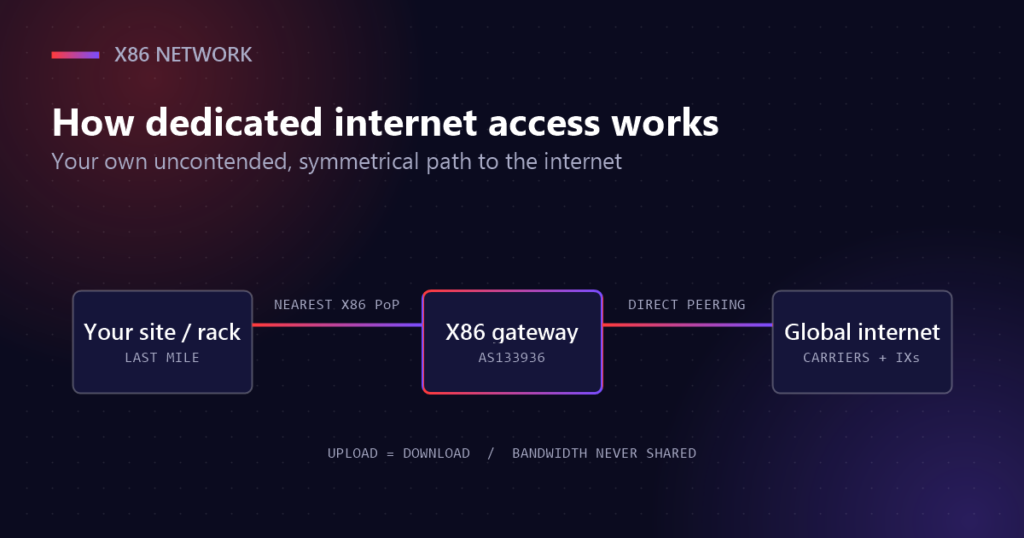
With X86, every connection follows the same three-step path.
- Last mile to the nearest point of presence. Your office, branch or data centre rack connects to the closest X86 PoP.
- The X86 Internet Gateway. Traffic is routed and optimised through our own autonomous system, AS133936.
- Premium internet. From the gateway, traffic reaches top-tier carriers, internet exchanges (IXs), cloud platforms and content networks directly.
Because X86 operates its own gateway, routes are engineered for performance rather than left to chance. Traffic takes the most efficient path available, which keeps latency low and throughput high.
Direct peering with the networks you use
Peering means exchanging traffic directly with another network instead of passing through intermediaries. X86 peers with major cloud and content providers, including Amazon, Microsoft, Google, Cloudflare, Akamai, Facebook, Netflix and Tencent. When your staff open a cloud application or join a video call, the traffic often reaches its destination in fewer hops, with lower latency.
Dedicated internet access vs broadband
Broadband is designed for homes and small offices. It is affordable because many customers share the same capacity, which is exactly why it slows down when everyone is online.
| DIA | Business broadband | |
|---|---|---|
| Bandwidth | Exclusive, never shared | Shared with other users |
| Upload speed | Symmetrical: upload equals download | Usually much slower than download |
| Performance at peak times | Consistent | Drops when the network is busy |
| Service level | SLA of up to 99.9% | Best effort |
| Routing | Engineered, with direct peering | Standard consumer routing |
| Support | 24/7 expert monitoring | General helpdesk |
Broadband still has a place, for example as a backup link or for guest Wi-Fi. But when the connection carries revenue, customer service or critical operations, a dedicated line is the safer choice.
Benefits of dedicated internet access for business
An exclusive connection keeps essential online tools, secure data transfers and communication running smoothly, helping your organisation stay productive and connected.
- Reliable performance. Fast, uninterrupted connectivity every day, without slowdowns caused by other users.
- Tailored to you. Bandwidth and options chosen to fit your business needs and budget.
- Room to grow. Scalable plans that increase capacity as your business expands, without compromising speed.
- Always supported. Expert help is available anytime, so problems are found and fixed quickly.
- Better security. A private connection with predictable routing is easier to protect and monitor than a shared one.
Who needs DIA?
Any organisation that can’t afford to go offline benefits from a dedicated connection. Common examples include:
- Data centres and hosting providers that serve customers around the clock.
- Healthcare organisations that rely on cloud records, telemedicine and secure data transfers.
- Education institutions running online classes and campus-wide systems.
- E-commerce businesses where every second of downtime means lost sales.
- Offices built on cloud applications and video conferencing, where upload speed matters as much as download.
If your team regularly complains about slow uploads, dropped calls or sluggish cloud tools, or if an outage would stop work entirely, it is time to consider an upgrade.
How much bandwidth do you need?
There is no single right answer, but a few habits make sizing much easier. Because the capacity is yours alone, you can plan around your real usage instead of padding for congestion caused by other customers.
- Start with your peak hour. Look at usage during your busiest period, not the daily average.
- Count video and voice. Every simultaneous video call uses upload and download capacity, so include meeting rooms and remote staff.
- Include cloud backups and sync. Off-site backups, file sharing and software updates can saturate a link if they run during working hours.
- Allow for growth. New staff, branches and applications add up. Choose a plan that can be upgraded without changing provider.
Many businesses find that moving to dedicated internet access lets them buy less headline bandwidth than they expected, because the capacity they pay for is always available. If you are unsure, start with a realistic figure and scale up as you measure real traffic.
What to look for in a DIA provider
Not all services are built the same way. When comparing offers, look beyond the headline speed.
- Network density. Extensive coverage across Asia Pacific means shorter routes and lower latency.
- Route engineering. A provider with its own autonomous system can steer traffic through the most efficient paths.
- A clear SLA. X86 offers an SLA of up to 99.9%, reducing disruption and supporting sustained performance.
- Scalable bandwidth. Make sure you can increase capacity easily as your business grows.
- Peering. Ask which carriers, exchanges and cloud platforms the provider connects to directly.
If you also run equipment in more than one facility, the same provider may be able to link those sites privately. Read our guide to data centre interconnect to see how that works, or explore colocation in Cyberjaya.
Frequently asked questions
How is DIA different from regular broadband?
It offers a private connection with symmetrical speeds and no shared bandwidth, backed by an SLA. Broadband shares capacity between users and is usually asymmetrical.
How reliable is it?
Very. X86 provides an SLA of up to 99.9%, low latency through engineered routes, and 24/7 monitoring from our network operation centre.
Can I increase my bandwidth later?
Yes. Plans are scalable, so you can add capacity as your business grows.
Get started with dedicated internet access
Begin by measuring how your team uses the connection today: the busiest hours, the cloud tools you rely on and how much you upload. Our team will use that to recommend the right bandwidth and design. Learn more on our DIA service page, or contact us for a tailored plan.