Data centre interconnect (DCI) is the private, high-capacity link that joins two or more data centres so they can work as one. If your business runs workloads in more than one facility, replicates data to a disaster recovery site or connects private infrastructure to the cloud, the quality of that link decides how fast, safe and available your services are.
This guide explains what DCI is, how it works, which businesses need it and what to look for in a provider, with examples from the X86 Network fabric that connects Malaysia to the rest of the world.
What is data centre interconnect?
DCI is a dedicated network connection between data centres across local, regional or global locations. It carries critical workloads between sites with low latency and high bandwidth, so applications, storage and backups behave as if they sat in the same building.
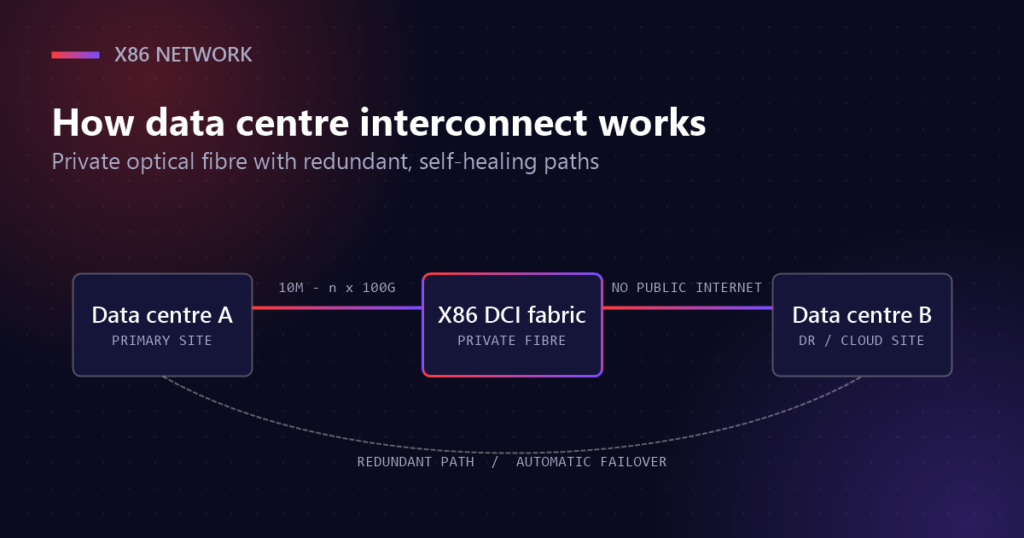
Unlike a connection over the public internet, DCI runs on private optical fibre. Your traffic travels on a network that is engineered for one job: moving data between facilities quickly, predictably and securely. Capacity can start small, at 10 Mbps, and scale to n×100 Gbps as your requirements grow.
In practice, a DCI service connects your racks in one facility to your racks in another. That could be two buildings in the same city, such as two sites in Cyberjaya, or a link from Kuala Lumpur to Singapore, Hong Kong, Tokyo, London or Ashburn.
How DCI works
A modern interconnect is built from three parts: the physical fibre, the network design that runs over it and the operations team that keeps it healthy.
- Private optical fibre. Traffic never touches the public internet, which reduces exposure to attacks and keeps performance consistent.
- Redundant, self-healing paths. If a fibre is cut, traffic moves to an alternative route automatically, so workloads stay available.
- Scalable bandwidth. Protected or unprotected circuits from 10 Mbps to n×100 Gbps, upgraded without redesigning your network.
- 24/7 monitoring. A network operation centre watches every circuit and responds to anomalies around the clock.
Getting connected is straightforward. You choose the facilities you want to link, pick a bandwidth and protection level, and the circuit is activated. On-net circuits with X86 go live the next business day. As demand grows, you add capacity or new sites rather than rebuilding the design.
Why businesses invest in data centre interconnect
Most organisations look at DCI when a single site becomes a single point of failure, when a regulator asks where their data lives or when growth starts to outpace the network. These are the five problems it solves most often.
1. The cost of downtime
Every minute offline costs revenue, productivity and customer trust. In financial services, e-commerce and healthcare, even seconds of interruption can cause serious losses. A resilient interconnect with redundant paths keeps mission-critical systems running during an outage, and fast activation means new capacity is available when you need it.
2. Keeping data where it belongs
Banking, healthcare and government face strict data sovereignty rules. Sensitive records must stay within specific countries or regions to meet regulations such as GDPR or local banking standards. A private link lets you store and process information in the right jurisdiction and move it between facilities without crossing restricted borders.
3. Growth without bottlenecks
Seasonal spikes and rapid expansion put pressure on any network. Traditional connections often can’t keep up, which leads to congestion and costly upgrades. With scalable bandwidth, you increase capacity as traffic grows and support new applications, users and markets without a redesign.
4. Hybrid and multi-cloud
Many businesses now run workloads across private infrastructure and several public cloud platforms. Without a common network, that creates silos and complexity. Data centre interconnect connects on-premises environments with public cloud, keeping transfers responsive and giving you one secure, resilient network for every environment.
5. Always-on connectivity
For mission-critical operations, downtime is not an option. A self-healing architecture, multiple routes and round-the-clock availability keep information moving even when part of the network fails.
Who needs DCI?
Any organisation that relies on more than one facility can benefit, but four groups use interconnects most heavily.
- Cloud providers stitch availability zones and edge sites into one low-latency fabric.
- Carriers and ISPs extend their footprint to new points of presence without building their own fibre.
- Multi-site operations replicate, back up and fail over between primary and disaster recovery sites.
- Businesses expanding abroad land in Singapore, Hong Kong, Tokyo, London or Ashburn from one provider.
Financial services, e-commerce, healthcare and enterprises with distributed teams are typical examples. If an hour without your secondary site would hurt, a dedicated interconnect is worth evaluating.
DCI compared with other options
Some teams try to link facilities with a VPN over ordinary internet connections. It works for light traffic, but it shares capacity with everyone else and depends on paths you don’t control.
| Private DCI | VPN over the internet | |
|---|---|---|
| Network path | Private optical fibre | Public internet |
| Latency | Low and predictable | Varies with congestion |
| Bandwidth | 10 Mbps to n×100 Gbps, dedicated | Limited by shared links |
| Resilience | Redundant, self-healing paths | Depends on each ISP |
| Exposure | Never on the public internet | Encrypted, but publicly routed |
If you only need a single dedicated circuit between two locations, an Ethernet Private Line is a point-to-point option that gives you a private Layer 2 link between two sites.
Planning your interconnect design
A good design starts with the applications, not the circuits. Before you request a quote, work through these questions with your infrastructure and application teams.
- Which sites must talk to each other? Map every facility, cloud region and disaster recovery location, and note which pairs exchange the most traffic.
- How much bandwidth do you need today, and in two years? Replication, backups and analytics jobs often grow faster than expected, so choose a service that scales without a redesign.
- How sensitive are your applications to latency? Synchronous storage replication and trading systems need the shortest possible route; nightly backups are more forgiving.
- Do you need protection? A protected circuit adds a diverse path that takes over automatically. For mission-critical links, it is usually worth it.
- Where must the data stay? Confirm any sovereignty requirements so routes can be planned within the right borders.
With those answers, an engineer can recommend the right mix of bandwidth, protection and locations, and show you how the network can grow with you.
What to look for in a provider
Not every interconnect service is built the same way. When you compare providers, ask about these points.
- Reach. How many facilities are on-net, and can they extend to a site that isn’t on the list yet? X86 serves more than 100 on-net data centres.
- Service level. Look for a clear SLA. X86 offers a 99.9% SLA on a self-healing network.
- Speed of delivery. On-net activation the next business day avoids long lead times.
- Scalability. Can you move from megabits to multiple 100 Gbps waves without changing provider?
- Operations. A 24/7 network operation centre should monitor every circuit and respond to incidents.
It also helps if the same provider can host your equipment. X86 offers data centre colocation in Cyberjaya with direct access to the interconnect fabric, so your racks are only a cross-connect away from every other site you use.
Data centre interconnect FAQ
Is DCI secure?
Yes. Traffic runs over private network layers rather than the public internet, and encryption can be added to protect sensitive information in transit.
Can DCI connect to cloud platforms?
Yes. It supports hybrid and multi-cloud designs, joining on-premises infrastructure with public cloud environments.
What latency should I expect?
Latency depends on distance and route design. An interconnect is engineered for ultra-low latency so that real-time synchronisation between sites works reliably.
How scalable is it?
Very. You can expand capacity, add sites or integrate more cloud services as demand grows, from 10 Mbps up to n×100 Gbps.
Getting started
Start by listing the facilities you need to connect, the traffic you expect between them and how much downtime you can tolerate. That gives a provider enough to propose a design, a bandwidth and a protection level.
To see which buildings are already on-net, use the facility finder on our data centre interconnect service page. Our network solutions team can then assess your current setup and design a link that fits your business.